
Indie Mac app
Krealize runs Krea 2 locally on Apple silicon Macs
The native macOS app keeps image generation on the Mac, supports custom LoRAs, and includes a custom inference engine built with MLX.
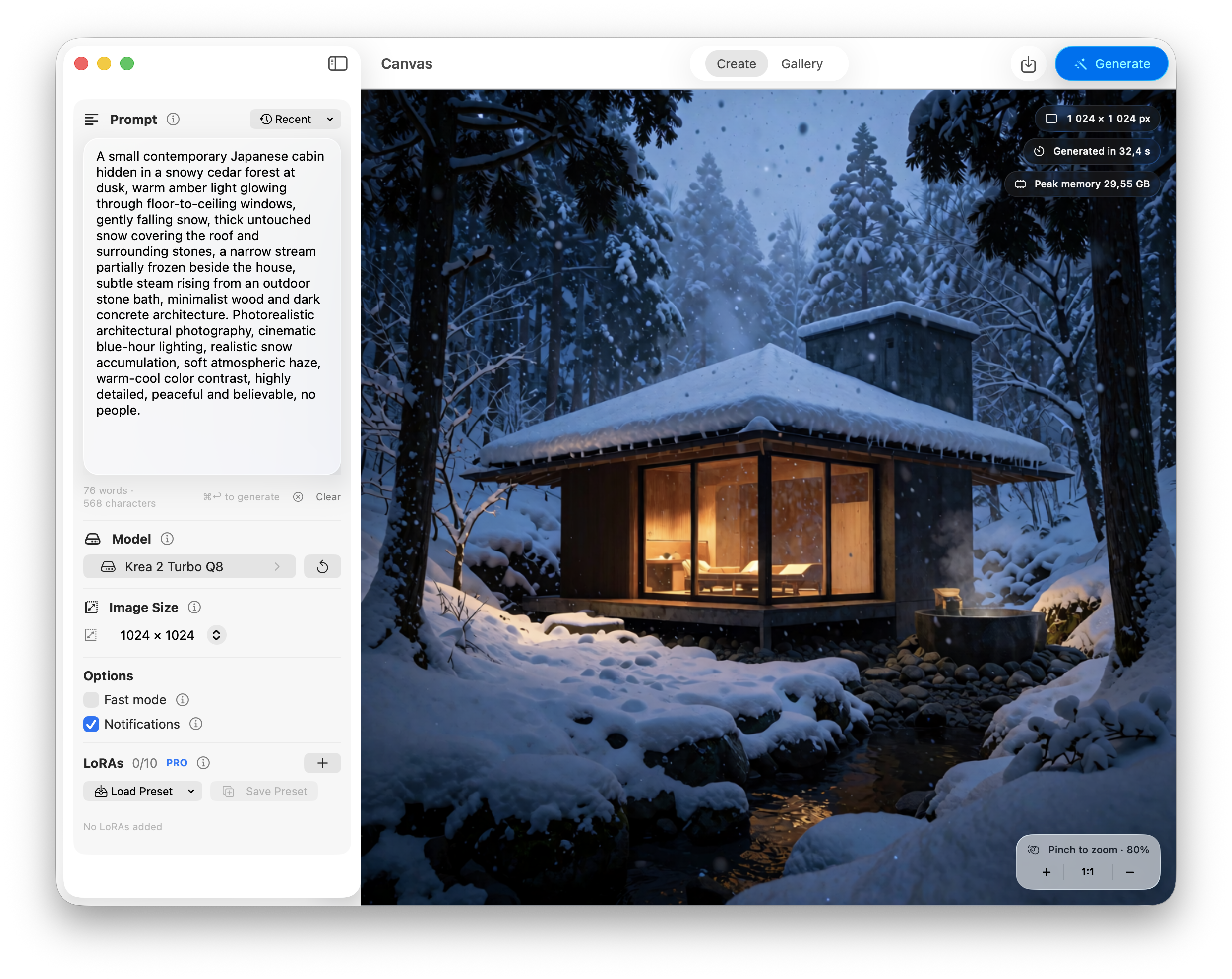
Krealize is a native Mac app for running Krea 2 image generation locally on Apple silicon. Prompts, model processing, and generated images stay on the Mac instead of being sent to an online image generation service.
The app places the full workflow in one window. The Create view includes the prompt, model selection, image size, generation options, progress, and current result. It supports square images at 512, 1024, 1280, and 1440 pixels, and a generation can be cancelled while it is running.
Krea 2, running locally on the Mac
Krealize uses Krea 2 Turbo Q8 by default, an unofficial quantized derivative of Krea 2 Turbo. The model is downloaded directly from Hugging Face after the user accepts the Krea 2 community license and acceptable use policy. The download is about 22.2 GB and is stored in Application Support.
There is no Python setup, Git checkout, command-line tool, or local web server. Users can also select another compatible Krea 2 MLX checkpoint from the app.
Generated images are saved to a local Gallery view with their prompt and generation metadata. The gallery can be searched by prompt or LoRA name, sorted, and resized. Settings from an existing image can be loaded back into the Create view, and the latest 50 prompts are kept locally for reuse.
Custom LoRAs and presets
Krealize PRO supports up to ten custom LoRAs in one generation. Every LoRA has its own strength control, and a group of LoRAs can be saved as a preset. Imported LoRA files are copied into the app's local storage, while image metadata records which adapters and strengths were used.
PRO also includes Fast mode, completion notifications, and PNG export through the standard macOS save panel. The free version includes the core local generation workflow.
A custom native inference engine
Krealize uses a custom C++ and Objective-C++ inference engine rather than a packaged end-to-end pipeline. MLX provides tensor operations and Apple GPU access, while the engine handles checkpoint loading, tokenization, prompt encoding, transformer execution, denoising, VAE decoding, LoRA fusion, cancellation, and Metal error recovery. It also selects a memory policy from the Mac's unified memory, staging model components on lower-memory systems and retaining more state on higher-memory Macs. The complete path runs inside the app, with no Python process or remote inference call.
Performance on Apple silicon
In one test, a 16-inch MacBook Pro with an M5 Max and 48 GB of unified memory generated a 1024 by 1024 image in 24 seconds with Fast mode enabled. A MacBook Air with an M5 and 24 GB of unified memory took 2 minutes and 25 seconds at the same output size with Fast mode disabled.
Fast mode renders internally at 90 percent of the requested dimensions, then uses Lanczos resizing and light sharpening to reach the selected output size. Results vary by Mac, available memory, image size, checkpoint, and LoRAs.
Local data and internet access
Prompts, generated images, image metadata, imported LoRAs, presets, settings, and model files are stored on the Mac. The app connects to Hugging Face for model downloads and to Polar for PRO purchase and license operations. Those requests do not include prompts or generated images. License information is stored in the macOS Keychain.
Download Krealize
Krealize 1.1 is available as a free download for Apple silicon Macs running macOS 26 or later. Krealize PRO is a one-time $5 purchase that unlocks Fast mode, notifications, PNG export, custom LoRAs, and LoRA presets. There is no subscription.
Krealize is an independent application, and Krea 2 remains subject to its own license and acceptable use policy. More information and the download are available at krealize.app. Press questions can be sent to info@krealize.app.